Introduction
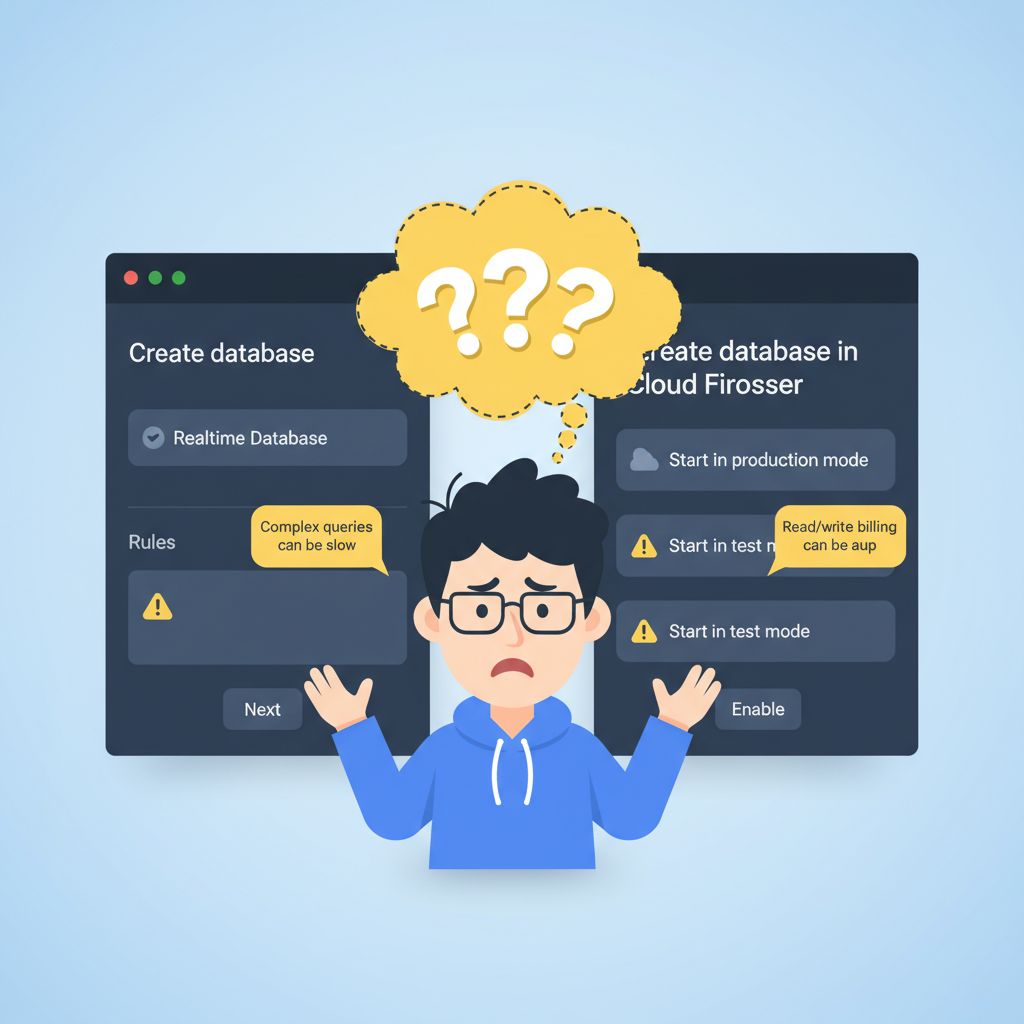
If you are building a new Flutter app right now, you’ve likely hit a wall before writing a single line of Dart code. You set up your Firebase project, click “Build” in the console, and immediately face a frustrating roadblock: Cloud Firestore or Realtime Database?
I know exactly how this feels. You stare at the screen, terrified of making the wrong choice. The documentation vaguely suggests that Firestore is the “newer, recommended” option, but then you see production chat apps and GPS trackers actively relying on Realtime Database. You might be feeling confused, stuck, and worried that picking the wrong one will result in a massive refactor six months down the line.
As a senior Flutter developer who has spent the last five years shipping and maintaining large-scale production apps, I can reassure you: this is one of the most common architectural dilemmas developers face. The debate over cloud firestore vs realtime database isn’t just theoretical; it dictates your app’s performance, scalability, and most importantly, your monthly billing.
This article is for Flutter developers who need to make a definitive decision today. We aren’t going to look at generic textbook definitions. Instead, we are going to break down exactly how these two databases behave in real-world Flutter apps in 2026 (running Flutter 3.20+), why this architectural choice matters, and how to unblock yourself right now so you can get back to building.
What the Problem Is
The problem developers experience isn’t that one database is “broken” and the other is “working.” The problem is a fundamental mismatch between how you think your data should be structured and how Firebase actually executes your queries.
When developers choose the wrong database, they usually realize it too late. They might pick Realtime Database for an e-commerce app, only to discover they cannot filter products by both “Price” and “Category” simultaneously. Or, they pick Firestore for a real-time multiplayer game, only to receive a $2,000 Firebase bill at the end of the month because of excessive read/write operations.
You are stuck because Firebase offers two NoSQL databases that look similar on the surface but have completely different underlying engines, pricing models, and querying capabilities.
Why This Happens (Real Explanation)
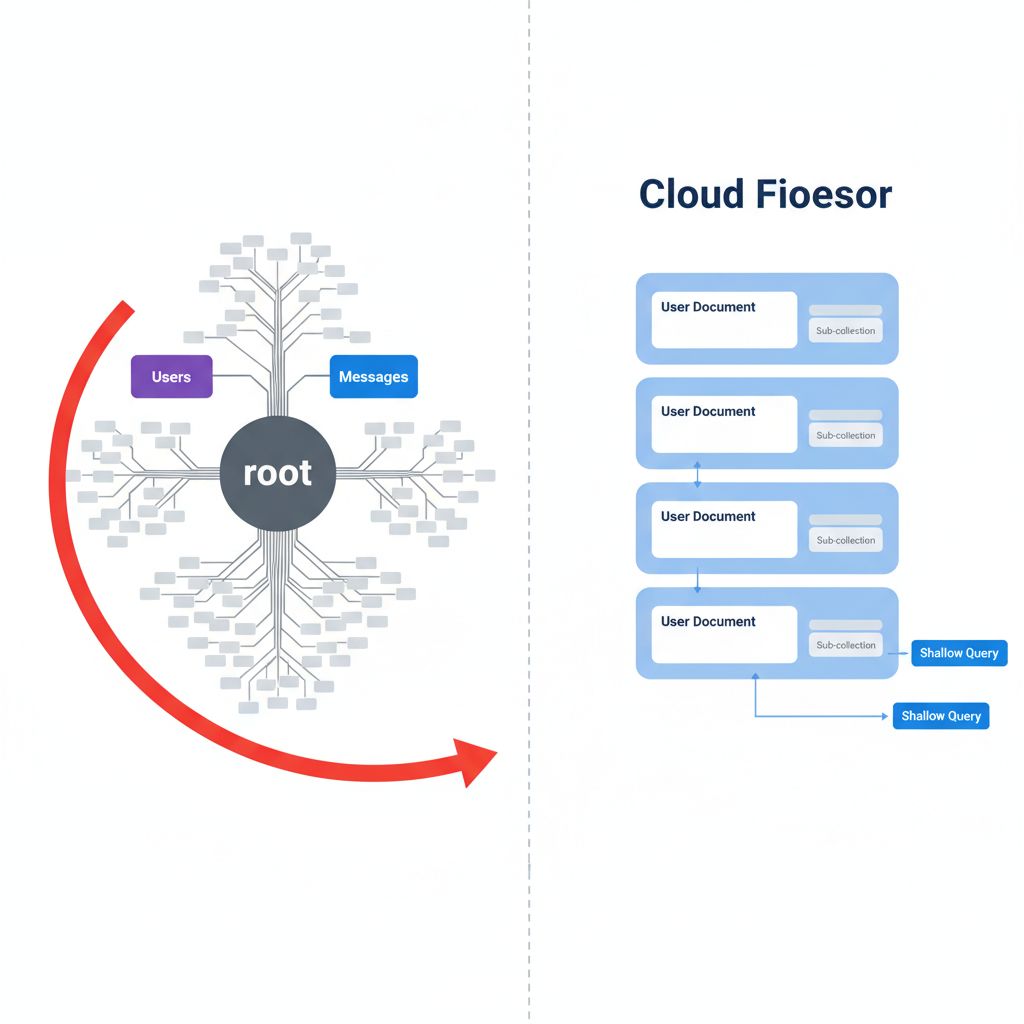
To understand why this choice is so punishing if you get it wrong, you have to look at the actual root cause: the data models. The core difference between a realtime database json tree vs firestore documents dictates everything from latency to offline support.
Firebase Realtime Database is essentially one gigantic JSON object. When you fetch a node in this tree, you download that node and everything nested inside it. It has no concept of “shallow queries.” If you have a list of users, and each user has a massive sub-list of chat messages, querying the user list downloads all the messages too. This causes massive memory bloat in Flutter apps if not architected perfectly.
Cloud Firestore was built explicitly to solve this problem. It uses a Collections and Documents model. If you query a collection of “Users”, it only returns the user documents. It does not automatically download the sub-collections nested inside those users. This makes Firestore incredibly scalable, but it introduces strict rules about how you can query your data.
When You Usually See This Issue
You will typically run into this architectural roadblock in specific scenarios:
- Building a Flutter Chat App: Wondering whether to use a flutter chat app firestore or realtime database architecture for typing indicators and message delivery.
- Implementing IoT or GPS Tracking: Trying to stream high-frequency coordinate updates to a map UI.
- Designing Complex Dashboards: Needing to filter lists by multiple parameters (e.g., showing active users who signed up in the last 7 days and live in New York).
- Scaling an MVP: Realizing your initial Realtime Database implementation is downloading megabytes of unnecessary JSON data on the startup screen.
Quick Fix Summary (Decision Shortcut)
If you are paralyzed by choice and just need the definitive answer for your flutter firebase backend architecture right now, follow this shortcut:
- Choose Cloud Firestore if: Your app needs complex querying (filtering/sorting by multiple fields), robust offline support, scales to millions of users, and your data is highly structured (e-commerce, social media feeds, SaaS dashboards).
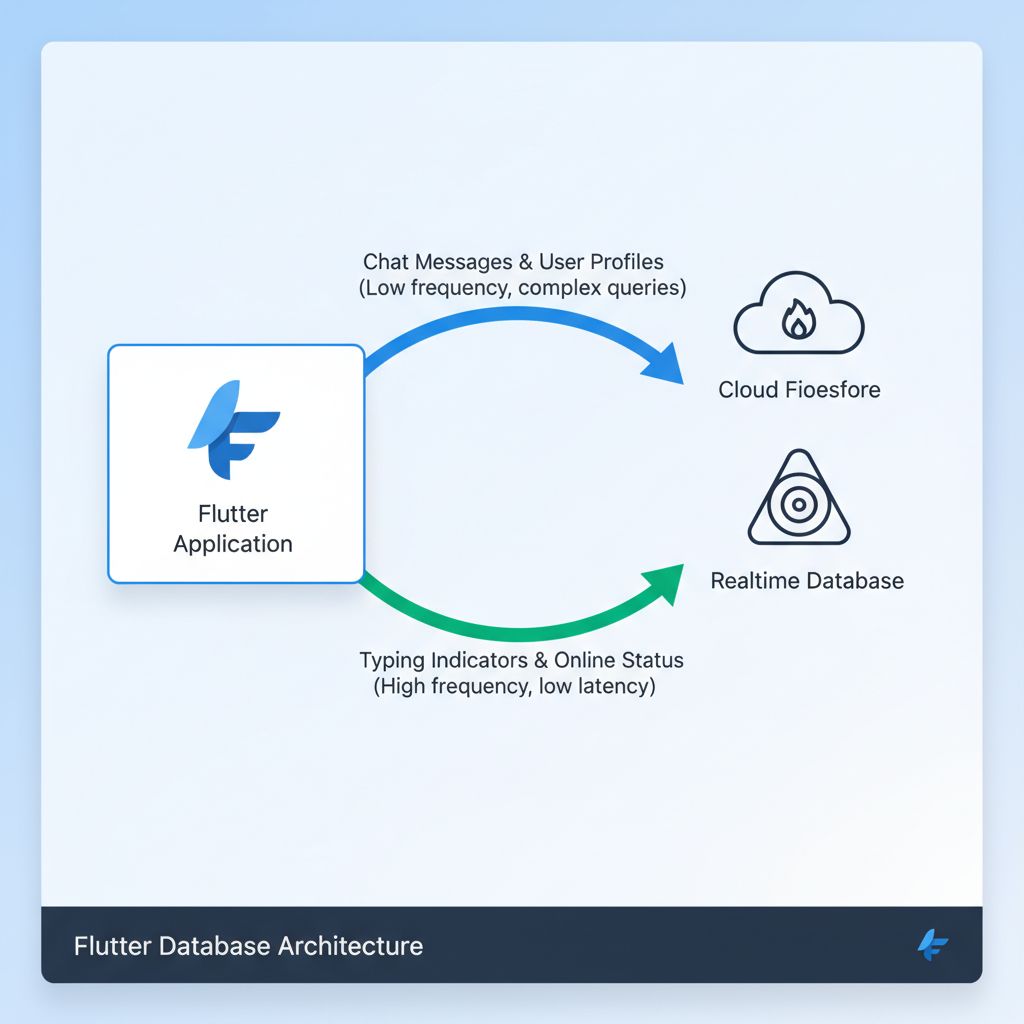
- Choose Realtime Database if: You need extreme low-latency pub/sub syncing, you are building presence systems (who is online/offline), you are syncing high-frequency data (multiplayer game state, live GPS tracking), or your data model is very simple key-value pairs.
- The Pro Move: Use both. They are designed to work together in the same project.
Step-by-Step Solution (Core Section)
Let’s look at exactly how to implement the right solution in Flutter, depending on your use case. We will use the official packages for our examples.
Scenario A: When to use Firestore (Complex Queries & Offline First)
If you are building a social feed, a task manager, or an e-commerce app, Firestore is your tool. The biggest advantage here is firestore offline support flutter provides out-of-the-box, and the ability to perform compound queries.
Here is how you handle firestore compound queries flutter to fetch specific data without downloading the whole database:
import 'package:cloud_firestore/cloud_firestore.dart';
import 'package:flutter/material.dart';

class ProductList extends StatelessWidget {
  final FirebaseFirestore _firestore = FirebaseFirestore.instance;

  @override
  Widget build(BuildContext context) {
    // WHY THIS WORKS: Firestore allows us to chain where() clauses.
    // This is a compound query. It only downloads the specific documents that match,
    // saving you massive amounts of bandwidth and memory.
    final query = _firestore
        .collection('products')
        .where('category', isEqualTo: 'electronics')
        .where('price', isLessThan: 500)
        .orderBy('price', descending: true);

    return StreamBuilder<QuerySnapshot>(
      stream: query.snapshots(),
      builder: (context, snapshot) {
        if (snapshot.hasError) return Text('Error: ${snapshot.error}');
        if (!snapshot.hasData) return CircularProgressIndicator();

        final products = snapshot.data!.docs;

        return ListView.builder(
          itemCount: products.length,
          itemBuilder: (context, index) {
            final data = products[index].data() as Map<String, dynamic>;
            return ListTile(
              title: Text(data['name']),
              subtitle: Text('\$${data['price']}'),
            );
          },
        );
      },
    );
  }
}
When to use this: Use this approach when your users need to filter data. Firestore charges you per document read. If this query returns 10 products, you are billed for 10 reads, regardless of how many thousands of products are in the database. For more details on the exact mechanics of these queries, you can review the official cloud_firestore documentation on pub.dev.
When NOT to use this: Do not use this if the `price` is updating 10 times a second (like a live stock ticker). You will burn through your read quota instantly.
Scenario B: When to use Realtime Database (Low Latency & Presence)
If you are wondering when to use realtime database over firestore, the ultimate example is a “Presence System” (showing if a user is online, offline, or typing). The firestore vs realtime database latency comparison heavily favors RTDB for these micro-updates.
Here is how you implement a lightweight presence system using the Realtime Database in Flutter:
import 'package:firebase_database/firebase_database.dart';
import 'package:firebase_auth/firebase_auth.dart';

class PresenceService {
  final FirebaseDatabase _database = FirebaseDatabase.instance;
  final FirebaseAuth _auth = FirebaseAuth.instance;

  void setupPresence() {
    final user = _auth.currentUser;
    if (user == null) return;

    final userStatusRef = _database.ref('status/${user.uid}');

    // WHY THIS WORKS: onDisconnect() is a unique feature of Realtime Database.
    // It tells the Firebase server to execute this write operation ONLY when
    // the server detects that the client has lost its socket connection.
    // Firestore does not have a native, instant equivalent for this.
    userStatusRef.onDisconnect().set({
      'isOnline': false,
      'last_seen': ServerValue.timestamp,
    }).then((_) {
      // Set the user to online when they successfully connect
      userStatusRef.set({
        'isOnline': true,
        'last_seen': ServerValue.timestamp,
      });
    });
  }
}
When to use this: Use RTDB for typing indicators, online status, or a live collaborative drawing canvas. RTDB charges for bandwidth and storage, not per operation. You can update a user’s status 100 times a minute, and it will cost fractions of a cent.
Common Mistakes Developers Make
- Mistake 1: Using Firestore for GPS Tracking. I once audited a Flutter app that was writing a delivery driver’s GPS coordinates to Firestore every 2 seconds. With 100 drivers, they were executing hundreds of thousands of writes daily, resulting in a shocking bill. Fix: High-frequency data belongs in Realtime Database.
- Mistake 2: Client-Side Filtering with RTDB. Developers often pull a massive JSON node from RTDB and try to filter it using Dart’s `.where()` list methods. This freezes the UI thread and causes memory leaks. Fix: If you need complex filtering, use Firestore.
- Mistake 3: Fearing the Hybrid Approach. Developers think they must choose only one. The best firebase nosql database comparison conclusion is that they complement each other. Most enterprise Flutter apps use Firestore for the core data and RTDB strictly for presence and signaling.
Warnings and Practical Tips
⚠️ Watch Your Billing Models: The firestore vs realtime database pricing structures are opposites. Firestore is cheap for storage but expensive for operations (reads/writes). RTDB is expensive for storage but cheap for operations. Always align your data frequency with the pricing model. You can verify the current rates on the Firebase pricing page to estimate your costs.
💡 Offline Caching: Firestore enables offline persistence by default in Flutter. If a user loses internet, `FirebaseFirestore.instance` will serve data from the local device cache automatically. RTDB requires manual configuration for disk persistence and is generally less robust for complex offline-first architectures.
Edge Cases and Limitations
While Firestore is incredibly powerful, it has limitations regarding array queries. If you need to find documents where an array contains multiple specific items (e.g., `array-contains-all`), Firestore struggles without complex workarounds.
Additionally, if you are forced to migrate realtime database to firestore flutter later because you hit scaling issues, be warned: there is no magic “click to migrate” button. You will have to write a custom Node.js script or Cloud Function to read your JSON tree, parse it, and write it into Firestore documents, which can cause significant downtime for live apps.
What Happens If You Ignore This Problem
If you flip a coin and pick the wrong database, you will eventually hit a wall. If you mistakenly chose Realtime Database for a complex app, your users will experience massive lag on startup as the app tries to download a 50MB JSON tree into the phone’s memory. The app will likely crash with out-of-memory (OOM) errors.
If you mistakenly chose Firestore for a high-frequency real-time game, your app will function perfectly—until the end of the month. You will log into your Google Cloud console and find a bill that could bankrupt an indie developer due to millions of unnecessary document reads.
FAQ Section
Which Firebase database should I use for Flutter in 2026?
For 90% of standard app development (social media, e-commerce, productivity, content delivery), you should default to Cloud Firestore. It handles complex queries, scaling, and offline persistence far better than RTDB.
Is Firebase Realtime Database deprecated?
No. Google continues to support and update it. It remains the superior choice for specific use cases like presence systems, IoT state synchronization, and ultra-low latency signaling.
How does Firebase Realtime Database vs Firestore performance compare?
For raw pub/sub latency (how fast a change on device A reaches device B), Realtime Database is slightly faster. However, for querying large datasets, firestore vs realtime database scalability heavily favors Firestore because query performance scales with the size of the result set, not the size of the entire database.
Final Takeaway & Conclusion
Deciding how to choose a Firebase database for your mobile app doesn’t have to be a guessing game. The frustration you felt looking at that setup screen is valid—the tools are similar but serve completely different architectural needs.
Here is your actionable checklist:
- Look at your UI designs. Do you have search bars, multiple filter dropdowns, and complex sorting? Pick Firestore.
- Look at your data frequency. Are you updating a value multiple times per second (like a cursor or GPS location)? Pick Realtime Database.
- Do you need your app to work seamlessly on a subway with no internet? Pick Firestore.
- Do you just need to know if a user’s app is currently open or closed? Pick Realtime Database.
Stop stressing over the initial choice. If you are building a modern, scalable Flutter app in 2026, start with Cloud Firestore for your core business logic and user profiles. You can always initialize a Realtime Database instance later specifically to handle the lightweight, real-time features. Implement the right tool for the right data, and you’ll build an app that is fast, scalable, and cost-effective.