The New Standard for Enterprise Mobile: Impeller Meets On-Device Intelligence
If you are evaluating cross platform app development services in 2026, the conversation has fundamentally shifted. A few years ago, the debate was centered on “native vs. cross-platform” and usually came down to a compromise: you chose Flutter or React Native to save budget, accepting that you might sacrifice a tiny fraction of scroll performance or animation fidelity.
That compromise is dead. With the maturation of the Flutter Impeller rendering engine and the explosion of hardware-accelerated on-device AI, we are no longer building “substitutes” for native apps. We are building architectures that often outperform legacy native codebases due to unified optimization strategies.
As a developer who has migrated massive enterprise codebases from Skia to Impeller and integrated local LLMs for offline capability, I’ve seen the difference firsthand. This article is for the CTOs and Technical Product Managers who need to understand why the technical stack under the hood matters for their bottom line.
The Problem: The “Jank” Barrier and Cloud Latency
To understand why the industry is pivoting, we have to acknowledge the two ghosts that have haunted cross-platform development for the last five years:
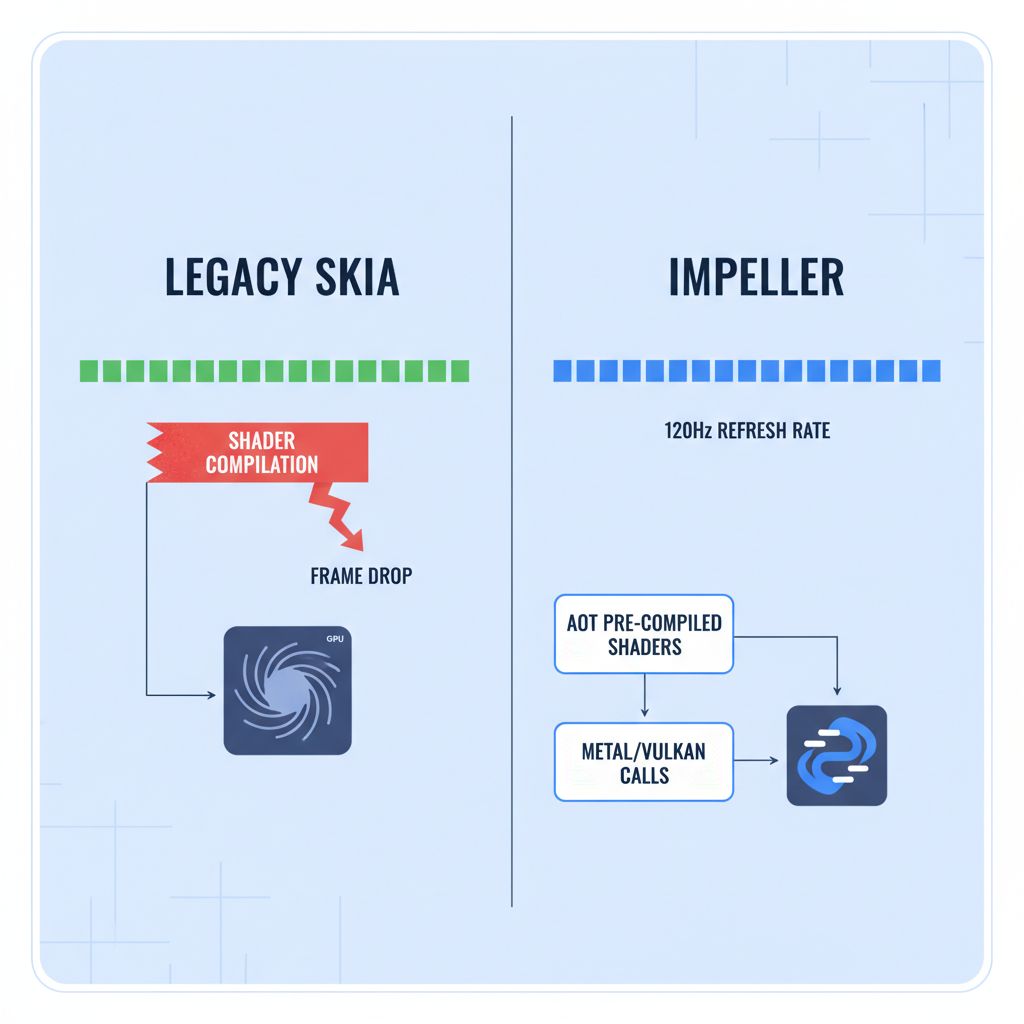
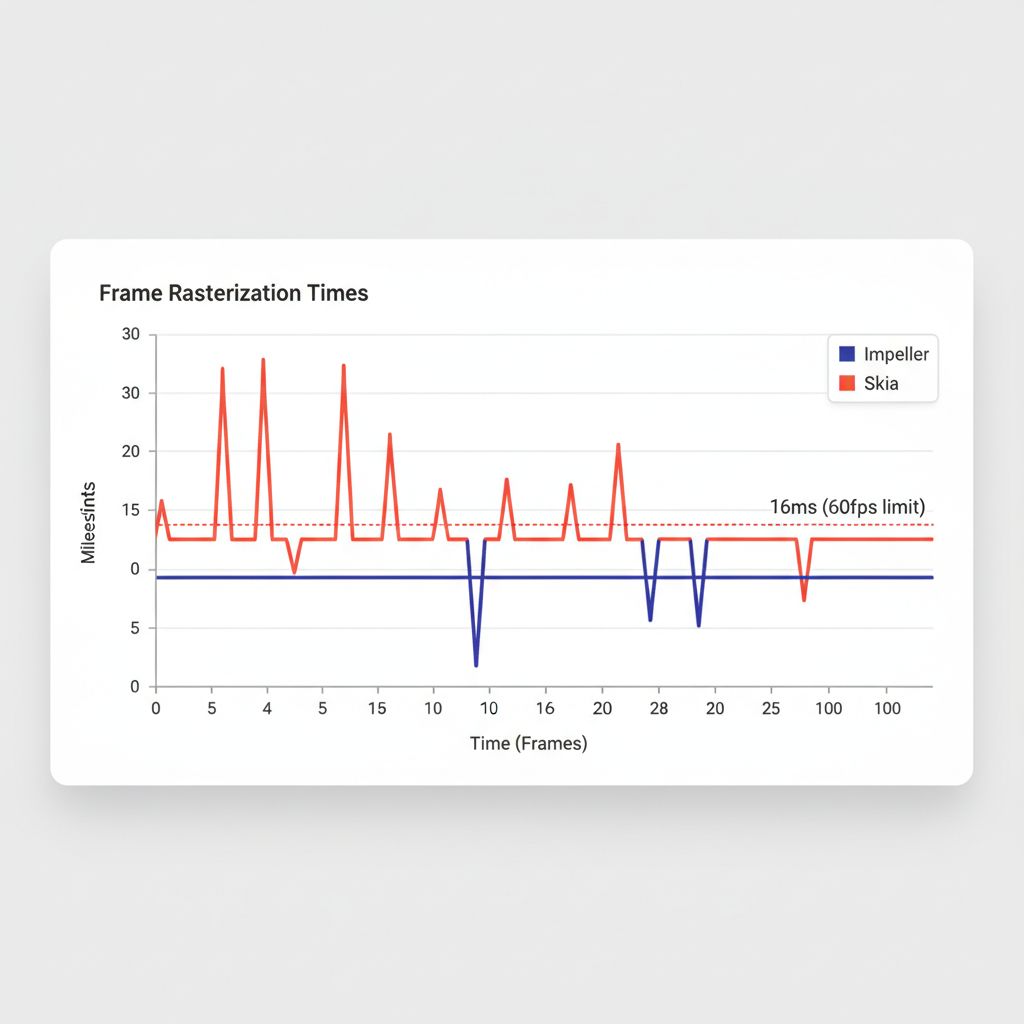
- Shader Compilation Jank: In the legacy Skia era, animations would stutter the first time they ran because the shaders were compiling Just-In-Time (JIT). For an enterprise banking app or a high-fidelity retail experience, this lack of polish was unacceptable.
- The “Dumb” Client: Apps relied entirely on REST APIs for intelligence. Every search, every recommendation, and every data validation required a round-trip to the server. In a world demanding offline-first machine learning, this architecture is too slow and too expensive.
You have likely seen this in production: a user opens a dashboard, scrolls down, and the UI freezes for 100ms. Or, a field technician tries to use an image recognition feature in a basement with poor signal, and the app fails. These aren’t just bugs; they are architectural limitations.
Solution Part 1: Impeller is Not Optional
Impeller is the core rendering engine that replaced Skia in Flutter. While Skia served us well, it was a general-purpose 2D graphics library (the same one used by Chrome). Impeller, by contrast, was built specifically for Flutter’s interactive workload.
Why Impeller Changes the Roadmap
The critical difference lies in how it handles shaders. Impeller uses pre-compiled shaders. This means the heavy lifting is done at build time, not runtime. When your user opens that complex data visualization dashboard, the GPU instructions are already ready.
For scalable enterprise architecture, this provides predictable performance. You no longer need to worry that a specific Android device with a specific GPU driver will stutter on your animations. If you are looking into how to enable Impeller on Android, the good news is that by 2026, it is the default for mostly all new Flutter builds, utilizing Vulkan backend for low-level control.
Solution Part 2: On-Device AI Integration
The second pillar of modern architecture is moving intelligence to the edge. We aren’t just talking about basic image classification anymore. We are talking about generative AI mobile SDK integrations and small language models (SLMs) running directly on the device.
Why move AI to the device?
- Privacy: For healthcare and finance, keeping data local is often a regulatory requirement.
- Latency: Zero network latency means instant feedback.
- Cost: Offloading inference from your cloud GPUs to the user’s NPU (Neural Processing Unit) saves massive cloud infrastructure costs.
The Architecture: Dart FFI and Isolates
Here is where many teams fail. You cannot run AI inference on the main UI thread. Even with Impeller, if you block the main thread with heavy math, the app will freeze.
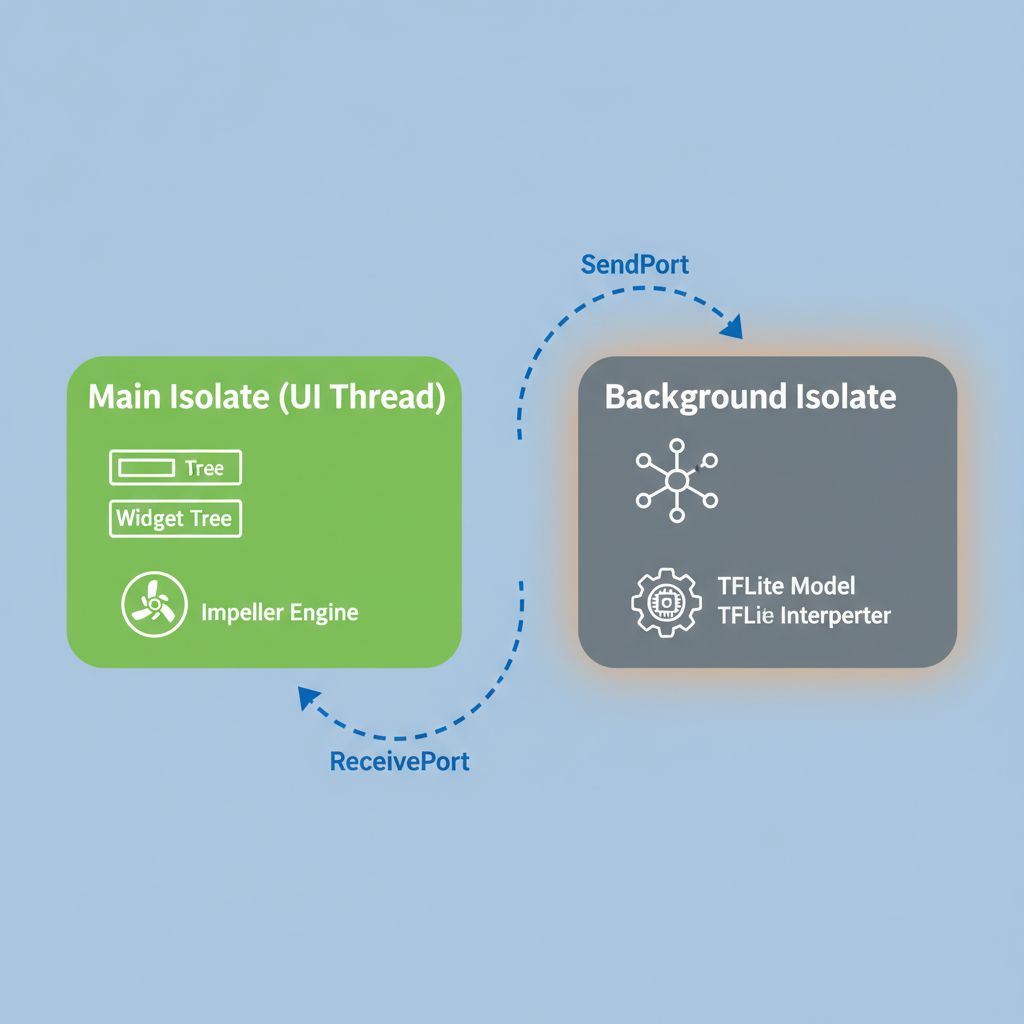
The solution utilizes Dart FFI (Foreign Function Interface) to communicate directly with C++ libraries (like TensorFlow Lite or ONNX Runtime) and wraps that communication in Dart Isolates (background threads).
Step-by-Step: Implementing the Architecture
Let’s look at a practical implementation pattern for a predictive UI rendering system. In this scenario, we use a local model to predict what the user will tap next to pre-load data, ensuring the UI feels instant.
1. The Background Inference Service
We use an Isolate to keep the heavy lifting off the UI thread. This separates our best state management for enterprise logic from the raw computation.
import 'dart:isolate';
import 'package:tflite_flutter/tflite_flutter.dart';

// Message wrapper to pass data between threads
class InferenceRequest {
  final List inputData;
  final SendPort responsePort;

  InferenceRequest(this.inputData, this.responsePort);
}

// The entry point for our background isolate
void spawnAIWorker(SendPort mainSendPort) async {
  final receivePort = ReceivePort();
  mainSendPort.send(receivePort.sendPort);

  // Load the model ONCE inside the isolate
  // This prevents reloading the model for every prediction
  final interpreter = await Interpreter.fromAsset('predictive_nav_model.tflite');

  await for (final message in receivePort) {
    if (message is InferenceRequest) {
      var output = List.filled(1, 0).reshape([1, 1]);

      // Run inference (CPU/GPU delegate handled by TFLite)
      interpreter.run(message.inputData, output);

      // Send result back to UI thread
      message.responsePort.send(output[0][0]);
    }
  }
}
This code establishes a dedicated worker. It loads the TensorFlow Lite for Flutter interpreter once and keeps it warm. This is critical for performance.
2. The UI Consumption Layer
Now, inside your main application logic, you communicate with this worker. This ensures that no matter how complex the calculation, Impeller keeps the UI running at 120Hz.
class PredictionService {
  Isolate? _isolate;
  SendPort? _workerSendPort;

  Future init() async {
    final receivePort = ReceivePort();
    _isolate = await Isolate.spawn(spawnAIWorker, receivePort.sendPort);

    // Wait for the worker to send us its SendPort
    _workerSendPort = await receivePort.first;
  }

  Future getPrediction(List userBehavior) async {
    final responsePort = ReceivePort();

    _workerSendPort?.send(InferenceRequest(
      userBehavior,
      responsePort.sendPort
    ));

    // Await the result without blocking the UI
    return await responsePort.first as double;
  }
}
Real-World Application: Secure On-Device Inference
When you look for high-end cross platform app development services, you should demand this level of architectural rigor. A common use case in 2026 is secure on-device inference for document scanning in banking apps.
Instead of uploading a photo of a driver’s license to the cloud (risking data interception and incurring latency), the app uses a local vision model to extract data. The GPU-accelerated graphics provided by Impeller draw the bounding boxes in real-time over the camera feed (using custom shaders), while the background isolate processes the OCR (Optical Character Recognition).
This decoupling is what separates a “demo app” from a scalable enterprise architecture.
Common Mistakes to Avoid
Even experienced teams trip up when integrating these technologies. Here are the most frequent errors I see in code reviews:
- Ignoring GPU Delegates: TFLite and other inference engines can run on the CPU, but they are significantly faster on the GPU or NPU. Always explicitly configure your interpreter options to use the Metal Delegate (iOS) or NNAPI (Android).
- Recreating Interpreters: Loading an AI model is expensive (disk I/O and memory allocation). Never load the model inside the build method of a widget. Load it once in a singleton or provider.
- Over-optimizing Pre-maturely: While Impeller is fast, it doesn’t fix bad logic. If your `build()` method is doing heavy JSON parsing, no rendering engine can save you.
Warnings and Practical Tips
⚠️ Warning: Be careful with memory management when using Dart FFI. Unlike standard Dart code, memory allocated in C++ (via FFI) is not automatically garbage collected by Dart. You must manually manage the lifecycle of your pointers to avoid memory leaks that will crash your app.
💡 Tip: For the Flutter enterprise roadmap 2026, consider adopting the “BFF” (Backend for Frontend) pattern even for local AI. Treat your on-device model as a local API. This keeps your UI code clean and agnostic to whether the intelligence is coming from the cloud or the device.
What Happens If You Ignore This?
If you stick to the old ways—relying purely on cloud APIs and ignoring the rendering pipeline nuances—your app will feel “foreign” on modern devices. Users in 2026 are accustomed to 120Hz refresh rates and instant interactions.
An app that displays a loading spinner for every interaction because it’s waiting for a server response will be uninstalled. An app that stutters because it’s compiling shaders during a scroll will receive poor store ratings. Performance is no longer a “nice to have”; it is the primary metric of user retention.
FAQ
Does Impeller increase app size?
Slightly, yes. Because Impeller includes pre-compiled shaders for various scenarios, the binary size can see a small increase compared to the Skia engine. However, for enterprise apps, the trade-off for eliminated jank is universally considered worth it.
Can I use Python models directly in Flutter?
No. You generally cannot run Python directly on mobile efficiently. You must convert your PyTorch or TensorFlow models into TFLite (`.tflite`) or ONNX formats to run them via the Dart FFI AI implementation.
Is Impeller available on all devices?
Impeller is the default on iOS and, as of the latest stable releases, is widely available on Android. However, for extremely old Android devices (OpenGL ES 2.0 era), Flutter may fall back to the legacy renderer. Always check the official Impeller documentation for the specific device support matrix.
Final Takeaway
The convergence of the Flutter Impeller rendering engine and on-device AI represents the maturity of cross-platform development. We are no longer emulating native apps; we are deploying high-performance, intelligent software that leverages the full capability of the hardware.
If you are planning your next large-scale project, ensure your architecture accounts for:
- AOT Shader Compilation via Impeller for consistent frame rates.
- Background Isolates for all heavy computation and inference.
- Hardware Acceleration for machine learning tasks.
By adhering to these standards, you ensure your application isn’t just ready for today, but scalable for the future of mobile computing.