If you are a CTO or a technical founder, you are likely losing sleep over one specific equation: Speed vs. Stability. You need to launch your MVP (Minimum Viable Product) yesterday. Investors are waiting, and the market is moving fast. But you also know the horror stories. You’ve seen startups push out a hasty prototype built on “spaghetti code,” only to realize six months later that they have to burn it all down and rewrite it from scratch to scale.
I have been building Flutter apps for over five years, seeing projects evolve from a napkin sketch to enterprise systems serving millions of users. The fear of “technical debt” is real, but the solution isn’t to slow down. The solution is architecture.
This article is for technical leaders who need to understand how to leverage cross-platform app development by garage2global standards—meaning, building software that is rapid enough for a startup but robust enough for an enterprise. We aren’t just talking about writing code; we are talking about building a unified codebase asset that grows with your valuation.
What the Problem Is: The “Throwaway MVP” Trap
The problem is not Flutter. The problem is how Flutter is often treated in the early stages of a startup.
Many developers treat an MVP as a “hackathon project.” They shove business logic inside UI widgets, they hardcode API calls directly into button `onPressed` events, and they ignore state management rules because “it’s just a prototype.”
When you do this, you aren’t building a foundation; you are building a house of cards. The moment you need to add a complex feature—like offline caching, real-time socket updates, or a second user role—the entire app becomes unstable. You end up with “Red Screens of Death,” janky animations, and a codebase that new developers are terrified to touch.
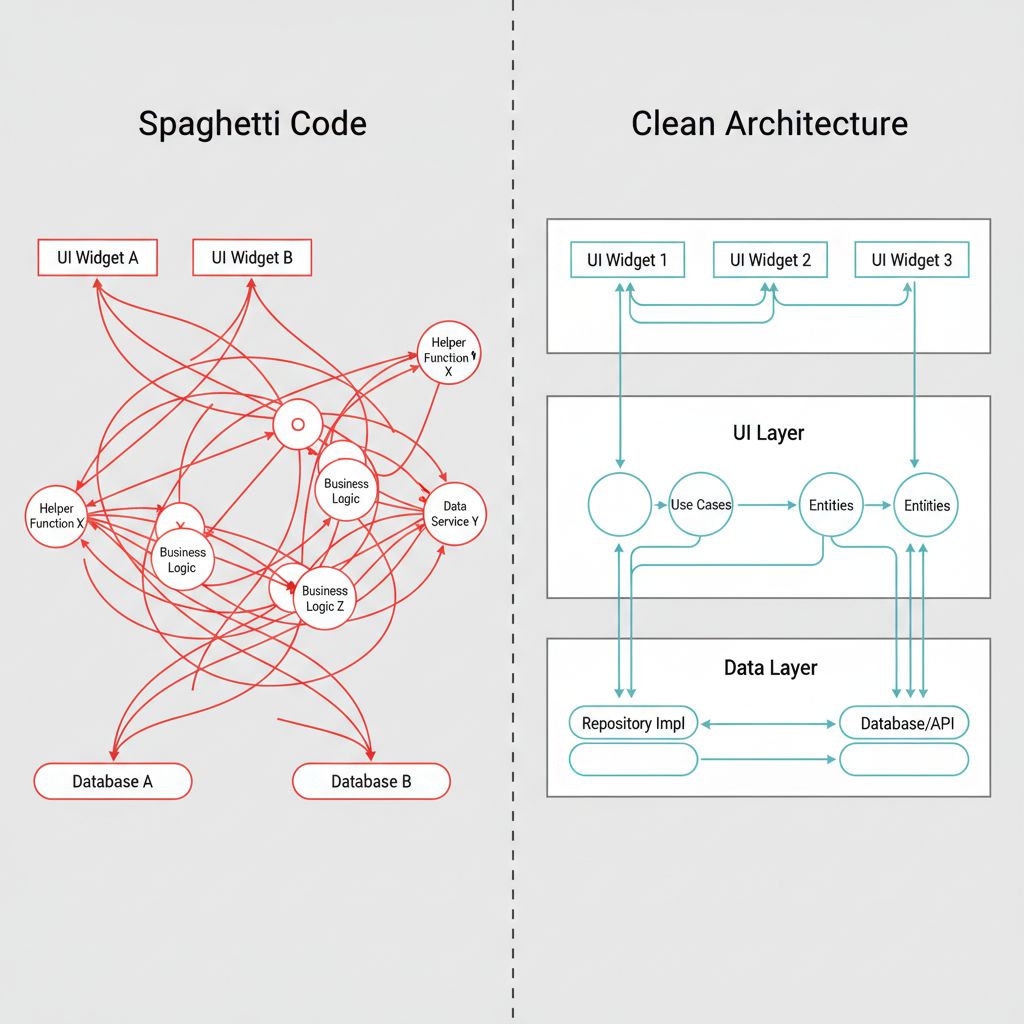
Why This Happens: The Coupling Trap
In my experience, the root cause of non-scalable MVPs is Tight Coupling.
Flutter makes it incredibly easy to build UI. It’s too easy. You can write a database query right inside a `Text` widget if you really wanted to (please don’t). Because the framework is so flexible, developers often skip the architectural boundaries that separate how things look from how things work.
When your UI knows exactly how your API works, you cannot change the API without breaking the UI. When your business logic relies on a specific screen being open, you cannot test that logic in isolation. This lack of separation is what kills velocity in the long run.
When You Usually See This Issue
You will hit this wall typically around “Version 1.5” of your product:
- The Pivot: You need to change a core feature based on user feedback, but the code is too brittle to change quickly.
- The Team Scale-up: You hire two new developers, but they spend their first month just trying to understand where the state is being updated.
- The Platform Expansion: You want to add a web or desktop target, but your logic is tied to mobile-specific dependencies.
Quick Fix Summary (Decision Shortcut)
If you are a CTO making decisions right now, here is the cheat sheet for a scalable Flutter MVP:
- Adopt Clean Architecture immediately: Separate your app into Data, Domain, and Presentation layers.
- Use a proven State Management library: Do not rely on `setState` for global data. Use Riverpod or BLoC.
- Dependency Injection is non-negotiable: Use `get_it` or `riverpod` to decouple your classes.
- Strict Linting: Enforce strong linting rules to prevent sloppy code commits.
Step-by-Step Solution: The Unified Codebase Architecture
To ensure your cross-platform app development by garage2global standards (or any high-standard team) succeeds, you must implement a layered architecture. This allows you to swap out parts of the system without rewriting the whole app.
1. The Layered Structure
We divide the application into three distinct zones. This is often referred to as “Clean Architecture” or the “Onion Architecture.”
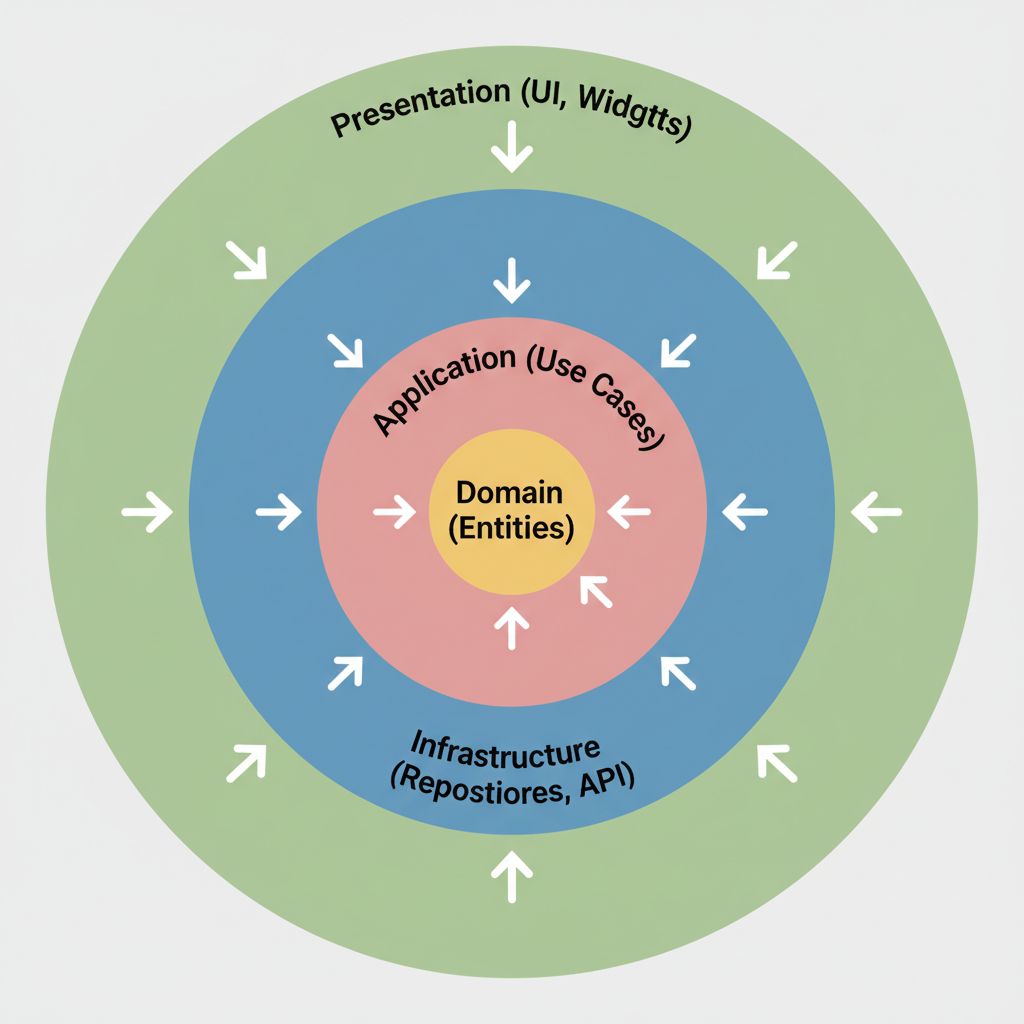
2. The Domain Layer (The “Truth”)
This is where your business rules live. It should have zero dependencies on Flutter widgets or external APIs. It is pure Dart code.
// domain/entities/user.dart
class User {
  final String id;
  final String email;
  final bool isPremium;

  User({required this.id, required this.email, required this.isPremium});
}

// domain/repositories/auth_repository.dart
// This is an abstract contract. The Domain doesn't care HOW we login,
// just that we CAN login.
abstract class AuthRepository {
  Future login(String email, String password);
  Future logout();
}
3. The Data Layer (The “Plumbing”)
This layer implements the contracts defined in the Domain. This is where you talk to Firebase, your REST API, or local storage. If you switch from REST to GraphQL later, you only change code here. The UI never knows the difference.
// data/repositories/auth_repository_impl.dart
import 'package:dio/dio.dart';
import '../../domain/repositories/auth_repository.dart';

class AuthRepositoryImpl implements AuthRepository {
  final Dio _httpClient;

  AuthRepositoryImpl(this._httpClient);

  @override
  Future login(String email, String password) async {
    try {
      final response = await _httpClient.post('/login', data: {
        'email': email,
        'password': password,
      });
      // Convert raw JSON to Domain Entity
      return UserMapper.fromJson(response.data);
    } catch (e) {
      throw ServerException();
    }
  }

  @override
  Future logout() {
    // Implementation details...
    return Future.value();
  }
}
💡 Pro Tip: By using Dependency Injection, you can inject a “FakeAuthRepository” during testing. This allows you to test your login flows without waiting for a real backend to be ready—a massive speed boost for MVPs.
4. The Presentation Layer (The UI)
Finally, the UI simply reacts to the state. It does not calculate taxes, it does not parse JSON. It just paints pixels.
For high-performance rendering, especially if you are looking into advanced graphics, you should stay updated on the latest rendering engines. I recently wrote about how Flutter Impeller & AI are scaling cross-platform services, which is critical when your MVP needs to transition into a visually heavy production app.
// presentation/login_screen.dart
class LoginScreen extends ConsumerWidget {
  @override
  Widget build(BuildContext context, WidgetRef ref) {
    // We watch the state, we don't manage logic here.
    final authState = ref.watch(authControllerProvider);

    return Scaffold(
      body: Column(
        children: [
          TextField(onChanged: (val) => ref.read(authControllerProvider.notifier).setEmail(val)),

          if (authState.isLoading)
            CircularProgressIndicator()
          else
            ElevatedButton(
              onPressed: () => ref.read(authControllerProvider.notifier).login(),
              child: Text("Login"),
            ),

          if (authState.errorMessage != null)
            Text(authState.errorMessage!, style: TextStyle(color: Colors.red)),
        ],
      ),
    );
  }
}
Common Mistakes Developers Make
Even with good intentions, I see teams fall into these traps:
- “God Classes”: Creating a `UserManager` class that handles API calls, validation, local storage, and navigation all in one file. Break it down.
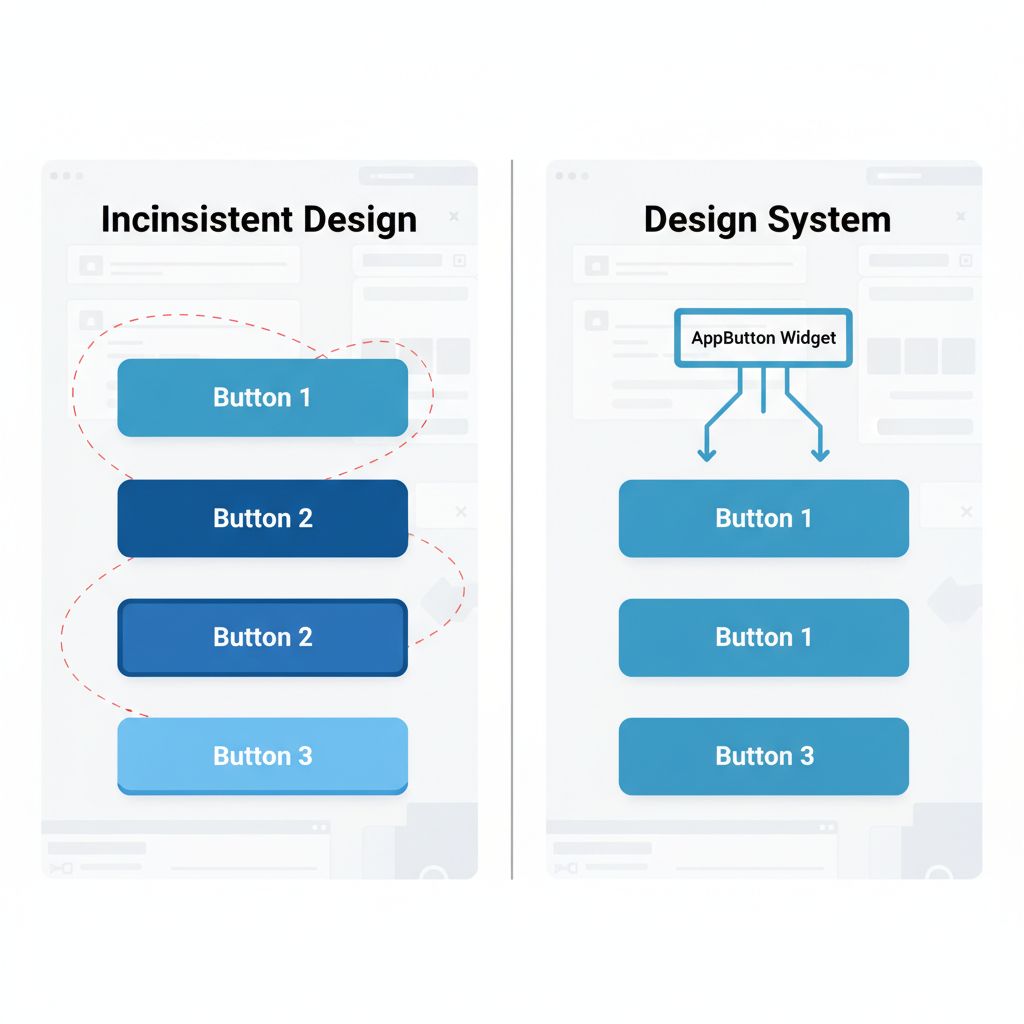
- Ignoring Widget Reusability: Copy-pasting button styles across 50 screens. When the designer changes the primary color, you have to edit 50 files. Use a central `AppTheme` or custom widget library.
- Over-optimizing too early: You don’t need a micro-frontend architecture for a To-Do list app. Start with Clean Architecture, but keep the folder structure simple until you actually need more complexity.
Warnings and Practical Tips
⚠️ Warning: Avoid using third-party packages for core business logic unless absolutely necessary. If a package is abandoned (which happens often in open source), your entire business logic is at risk. Wrap external packages in your own interfaces (the Adapter Pattern).
💡 Tip: Invest time in setting up a CI/CD pipeline (Codemagic or GitHub Actions) on day one. Automating the build process saves hundreds of developer hours over the life of the project. For more on the ecosystem that supports this, check the official Flutter Ecosystem documentation.
What Happens If You Ignore This Problem
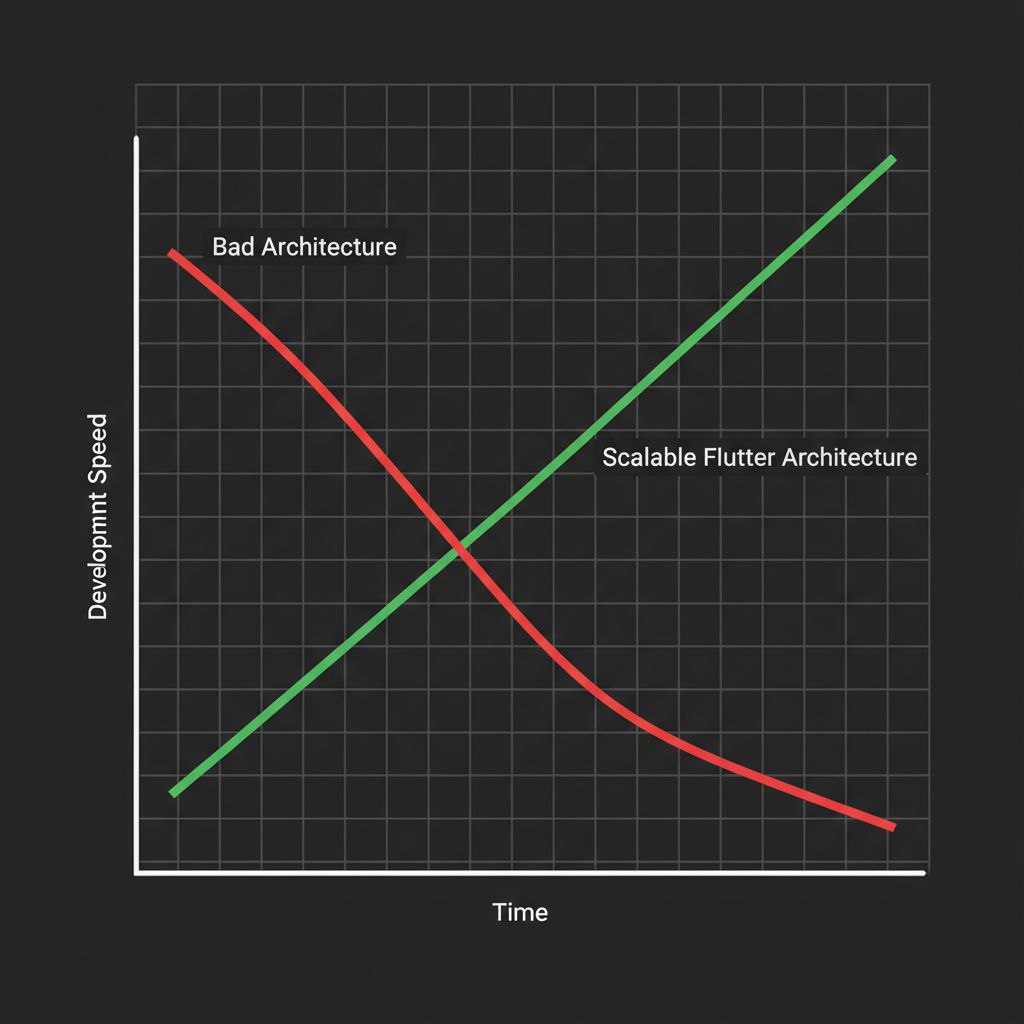
If you ignore architecture in favor of raw speed, you create a “Legacy Codebase” from the moment you launch. Your cost of development will not be linear; it will be exponential. Every new feature will take longer to build than the last one because developers have to navigate through a minefield of side effects and broken dependencies.
Eventually, you will face the “Rewrite Decision,” where you have to pause all feature development for 3-4 months just to fix the foundation. For a startup, that pause is often fatal.
FAQ Section
Can Flutter really scale to enterprise levels?
Absolutely. Companies like BMW, Nubank, and Toyota use Flutter for massive, mission-critical applications. The limitation is rarely the framework; it is almost always the architecture implemented by the team.
Is Clean Architecture overkill for a simple MVP?
It might feel like extra boilerplate for the first week. But by week four, when you need to change your database or add a new feature, that structure pays for itself ten times over. It is the difference between a prototype and a product.
Should I use GetX, Riverpod, or BLoC?
For scalable teams, I recommend Riverpod or BLoC. They enforce separation of concerns and are highly testable. GetX is great for solo developers or very small apps, but it can encourage bad habits (like coupling navigation to logic) that hurt scalability in larger teams. For a deep dive on state management options, the official Flutter documentation offers a great comparison.
Final Takeaway
Building a scalable MVP isn’t about writing code faster; it’s about writing code that doesn’t need to be deleted later. By adopting a unified codebase architecture—specifically Clean Architecture—you protect your startup’s future.
Your goal is to reach a point where adding a new feature is boring. It should be predictable, safe, and fast. That is the hallmark of a mature engineering team.
Actionable Checklist:
- Define your Domain entities before writing a single widget.
- Choose one state management solution and stick to it.
- Set up a “Design System” folder for your reusable UI components.
- Review your architecture against the principles of separation of concerns.
You have the tools. Now, build something that lasts.